
What is Apache Airflow?
To understand Apache Airflow, it’s essential to understand what data pipelines are. Data pipelines are a series of data processing tasks that must execute between the source and the target system to automate data movement and transformation. For example, if we want to build a small traffic dashboard that tells us what sections of the highway suffer traffic congestion. We will perform the following tasks:
- Fetch real-time data from a traffic API.
- Clean or wrangle the data to suit the business requirements.
- Analyze the data.
- Push the data to the traffic dashboard.
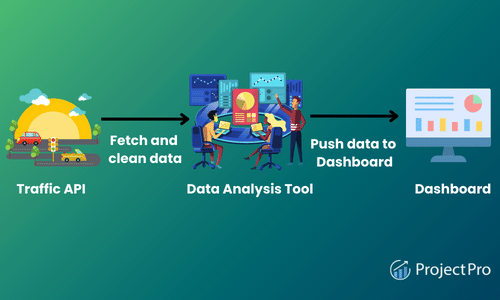
From the above diagram, we can see that our simple pipeline consists of four different tasks. Notably, each task needs to be performed in a specific order. For example, analyzing and then cleaning the data won’t make sense. Therefore, we must ensure the task order is enforced when running the workflows.
Apache Airflow is a batch-oriented tool for building data pipelines. It is used to programmatically author, schedule, and monitor data pipelines commonly referred to as workflow orchestration. Airflow is an open-source platform used to manage the different tasks involved in processing data in a data pipeline.
How Does Apache Airflow Work?
A data pipeline in airflow is written using a Direct Acyclic Graph (DAG) in the Python Programming Language. By drawing data pipelines as graphs, airflow explicitly defines dependencies between tasks. In DAGs, tasks are displayed as nodes, whereas dependencies between tasks are illustrated using direct edges between different task nodes. If we apply the graph representation to our traffic dashboard, we can see that the directed graph provides a more intuitive representation of our overall data pipeline.
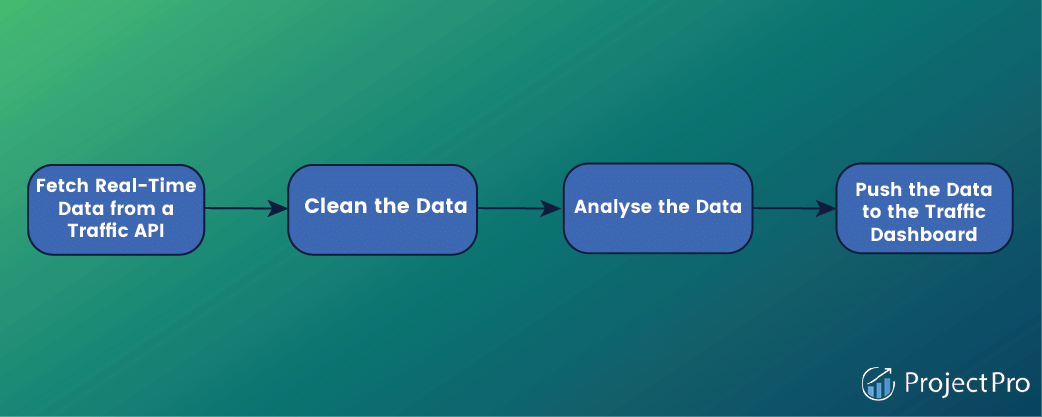
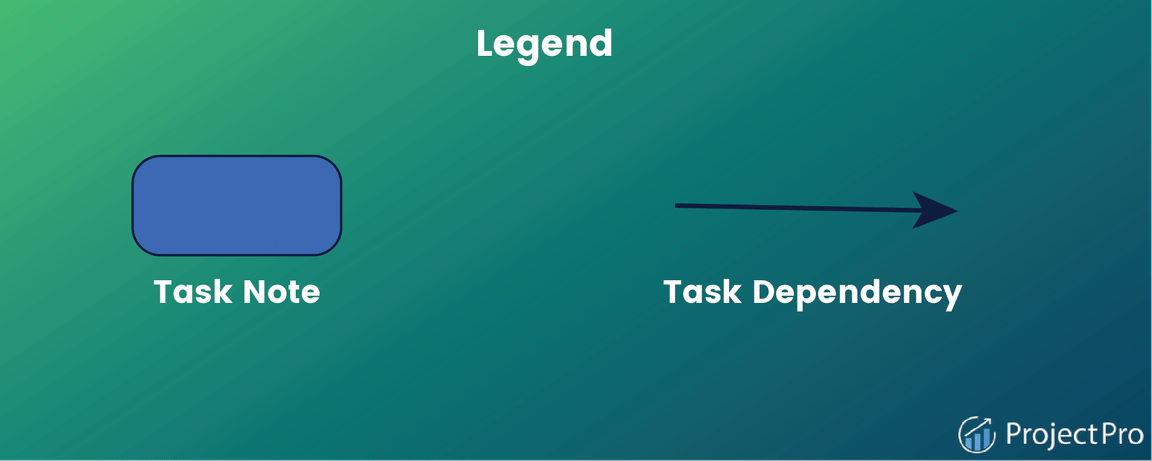
The edges direction depicts the direction of the dependencies, where an edge points from one task to another. Indicate the task that needs to be completed before the next one is executed.
A quick glance at the graph view of the traffic dashboard pipeline indicates that the graph has direct edges with no loops or cycles (acyclic). The acyclic property is significant as it prevents data pipelines from having circular dependencies. As shown below, this can become problematic by introducing logical inconsistencies that lead to deadlock situations in data pipeline configuration in Apache Airflow as shown below –
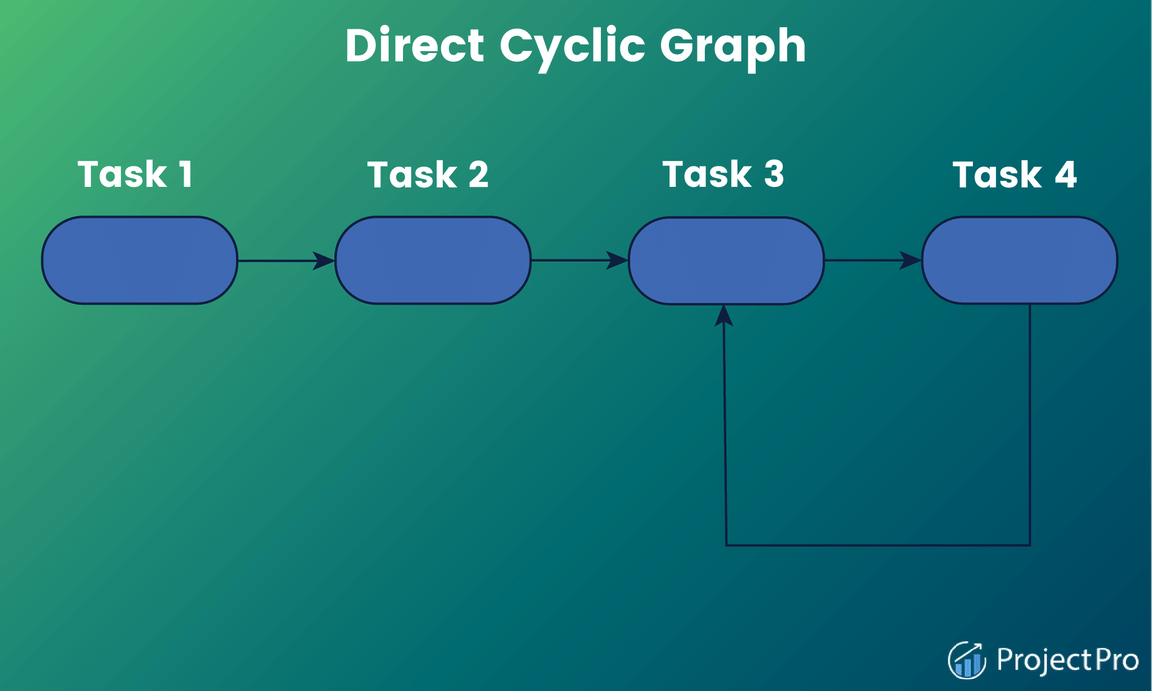
In the figure above, task 3 will never execute because of its dependence on task 4. Unlike in the traffic data DAGs Airflow where there is a clear path on how the four different types of tasks are to be executed. The Direct Cyclic Graph above lacks a transparent execution of tasks due to the interdependencies between task 3 and task 4.
How is Data Pipeline Flexibility Defined in Apache Airflow?
In Apache airflow, a DAG is defined using Python code. The Python file describes the structure of the correlated DAG. Consequently, each DAG file typically outlines the different types of tasks for a given DAG, plus the dependencies of the various tasks. Apache Airflow then parses these to establish the DAG structure. In addition, DAGs Airflow files contain additional metadata that tells airflow when and how to execute the files.
The advantage of defining Airflow DAGs using Python code is that the programmatic approach provides users with much flexibility when building pipelines. For instance, users can utilize Python code for dynamic pipeline generation based on certain conditions. The flexibility offers great workflow customization, allowing users to fit Airflow to their needs.
Also, when you create a DAG using Python, tasks can execute any operations that can be written in the programing language. This has, over the time led to the development of many extensions by the Airflow Community. That enables users to execute tasks across vast systems, including external databases, cloud services, and big data technologies.
How are Pipelines Scheduled and Executed in Apache Airflow?
After a data pipeline’s structure has been defined as DAGs, Apache Airflow allows a user to specify a scheduled interval for every DAG. The schedule determines exactly when Airflow runs a pipeline. Therefore, users can tell the Airflow to execute every week, day, or hour. Or define even more complex schedule intervals to deliver desired workflow output.
To further visualize how Airflow runs DAGs, we must look at the overall process involved in developing and running the DAGs.
Components of Apache Airflow DAGs
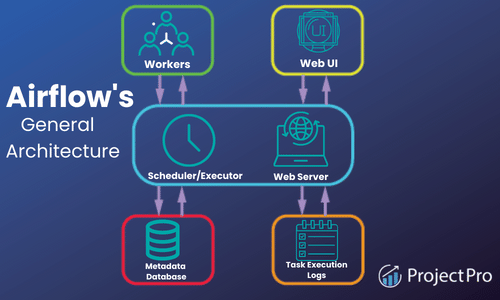
At a high level, Apache Airflow is split into three main components, which include:
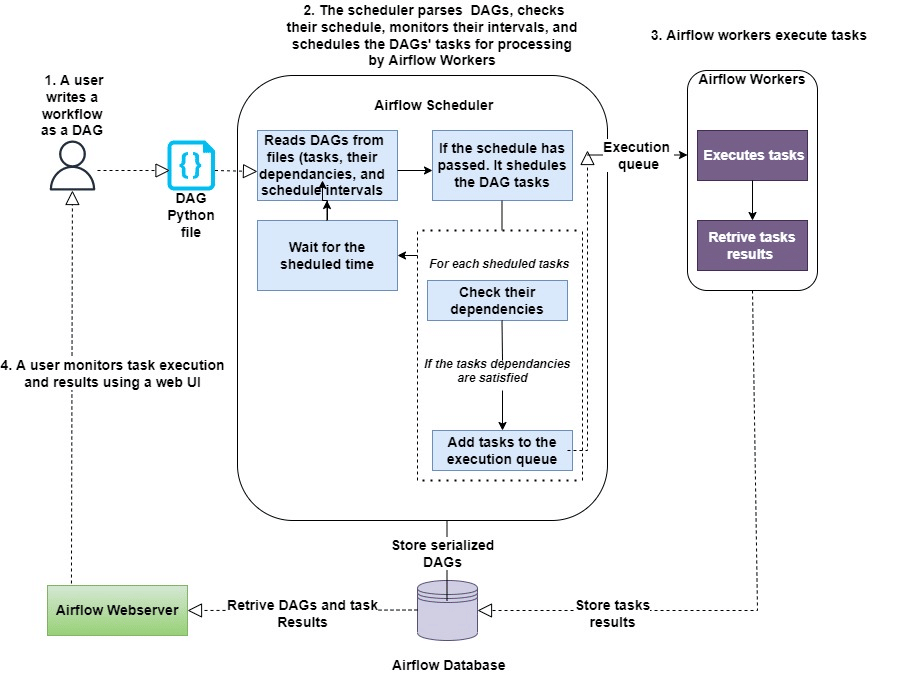
The Airflow Scheduler: This is responsible for parsing DAGs, checking their schedule, monitoring their intervals, and scheduling the DAGs’ tasks for processing by Airflow Workers if the schedule has passed.
The Airflow Workers: These are responsible for picking up tasks and executing them.
The Airflow Webserver: This is used to visualize pipelines running by the parsed DAGs. The web server also provides the main Airflow UI (User Interface) for users to monitor the progress of their DAGs and results.
Tasks Versus Operators in Apache Airflow
In Apache Airflow, operators are used for performing a single piece of work. Some operators perform specific work, whereas others perform generic work. For example, the BashOperator and PythonOperator are generally used to run bash and Python scripts, respectively. On the other hand, the EmailOperator and SimpleHTTPOperator are used for sending emails and calling HTTP endpoints, respectively.
While from a user’s perspective, tasks and operators may be used to refer to the same thing, which is not the case in Airflow. Tasks in airflow are used to manage the execution of operators, and they can be thought of as small wrappers around operators that ensure the latter executes correctly.
Kickstart your data engineer career with end-to-end solved big data projects for beginners.
Apache Airflow Use Cases – When to Use Apache Airflow
Airflow is an excellent choice if you want a big data tool with rich features to implement batch-oriented data pipelines. Its ability to manage workflows using Python code enables users to create complex data pipelines. Also, its Python foundation makes it easy to integrate with many different systems, cloud services, databases, and so on.
Because of its rich scheduling capabilities, airflow makes it seamless for users to run pipelines regularly. Furthermore, its backfilling features make it easy for users to re-process historical data and recompute any derived datasets after making changes to the code, enabling dynamic pipeline generation. Additionally, its rich web UI makes it easy to monitor workflows and debug any failures.
How Can Apache Airflow Help Data Engineers?
Apache Airflow is a tool that can boost productivity in the day-to-day operations of a data engineer. Just to mention a few use cases, the tool can help data engineers monitor workflows using notifications and alerts, perform quality and integrity checks, transfer data, orchestrate machine learning models, and much more.
Getting Started with Airflow: Apache Airflow Tutorial for Beginners
As a data engineer, you’ll be frequently tasked with cleaning up messy data before processing and analyzing it. So in our sample data pipeline example using airflow, we will build a data cleaning pipeline using Apache Airflow that will define and control the workflows involved in the data cleaning process.
Building Your First Data Pipeline from Scratch using Apache Airflow
Building data pipelines from scratch is the core component of a data engineering project. This Apache Airflow tutorial will show you how to build one with an exciting data pipeline example.
Data Pipelines with Apache Airflow – Knowing the Prerequisites
Docker: To run a DAG in Airflow, you’ll have to install Apache Airflow in your local Python environment or install Docker on your local machine. In our example, we will demonstrate our data pipeline using Docker containers.
Docker-Compose: This is a tool that defines and shares multiple containers. Making it easier for containers to communicate with each other. If you installed Docker on your local machine, then you already have Docker Compose.
Python 3: An experience of working with Python will help build data pipelines with Airflow because we will be defining our workflows in Python code.
The Data Cleaning Pipeline
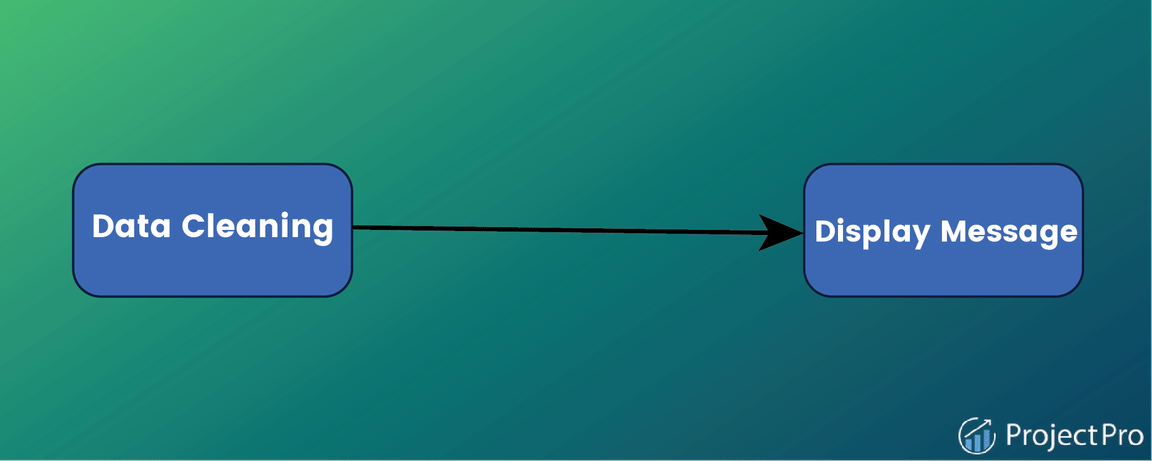
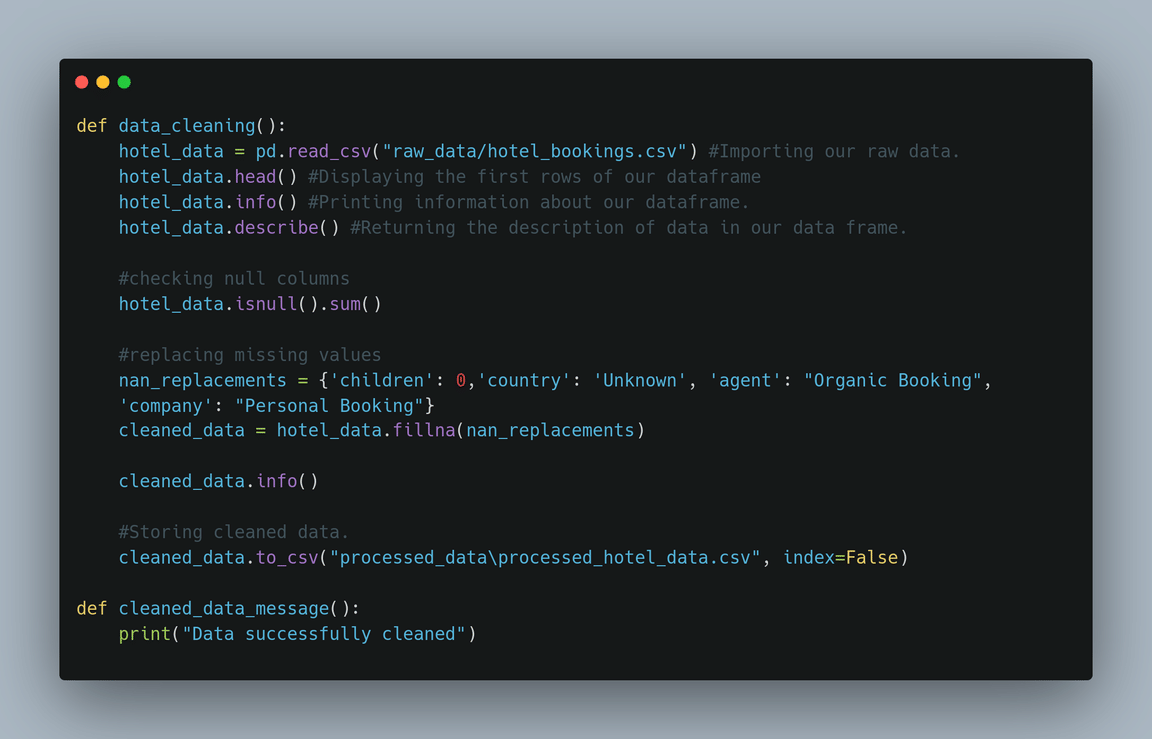
Let’s assume we have clients sending hotel booking demand data from multiple data sources to a scalable storage solution. Before analyzing the raw data, we need to clean it and then load it into a database where it can be accessed for analysis. For simplicity in our DAG example, we will work using local storage. Our Airflow DAG will have two tasks. First, the DAG will pick up the data from local storage, processes it, and load it into local storage. Secondly, the DAG will display a message once the data is successfully processed.
Writing Your First DAG
After installing Docker and Docker Compose, you’ll be ready to move to the Apache Airflow part.
- First, create a new folder called airflow-docker.
mkdir airflow-docker - Inside the folder, download the docker-compose file already made for us by the Airflow Community. You do this using the following command:
curl -LfO ‘https://airflow.apache.org/docs/apache-airflow/2.3.3/docker-compose.yaml‘
The file contains several services definitions, including airflow-scheduler, airflow-webserver, airflow-worker, airflow-init, postgres, and redis. - Open your code editor, followed by the docker-compose.yaml file, and add the raw_data and processed_data volumes in the file.
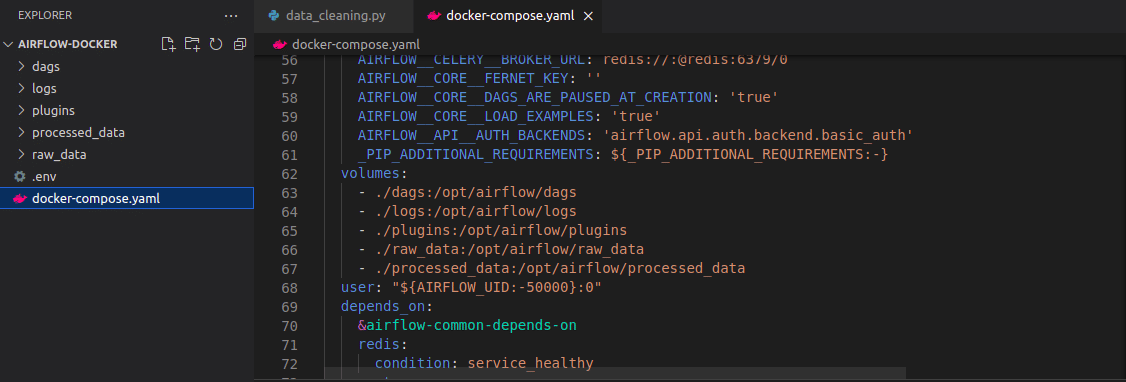
- Inside the airflow-docker folder, create the folder logs, dags, plugins, processed_data, and raw_data. This can be done using the command:
mkdir -p ./dags ./logs ./plugins ./processed_data ./raw_data
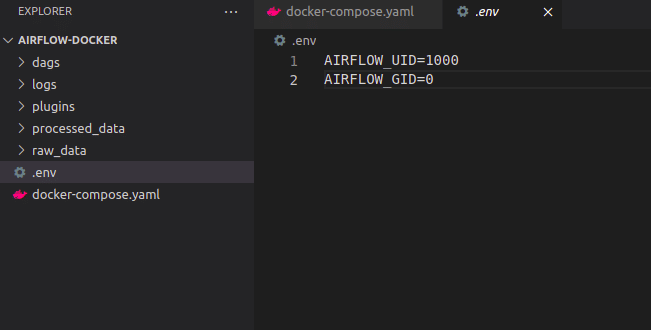
If you’re in macOS or Linux, you will need to export some environment variables to ensure the user and root permissions are the same between the folders from your host and the folders in your containers. You do this using the following command that sets the group ID to 0 and lets the quickstart know your user ID. The env file will be automatically loaded by the docker-compose file:
echo -e “AIRFLOW_UID=$(id -u)” > .env.
- If you open the .env file, you should obtain a similar to the one below:
Defining and Configuring Your First DAG
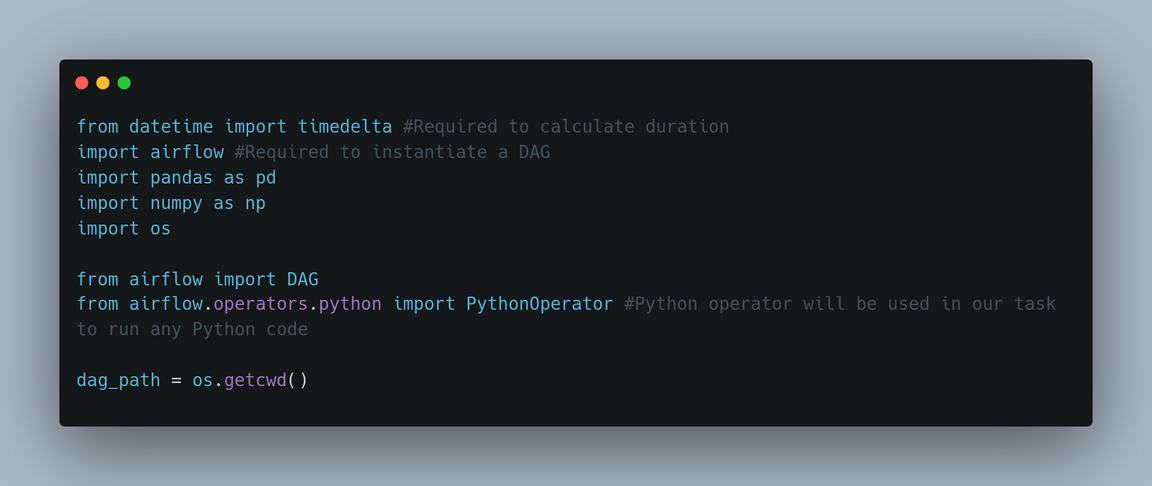
1. Start by importing all the libraries you need.
2. Write your Python callable functions.
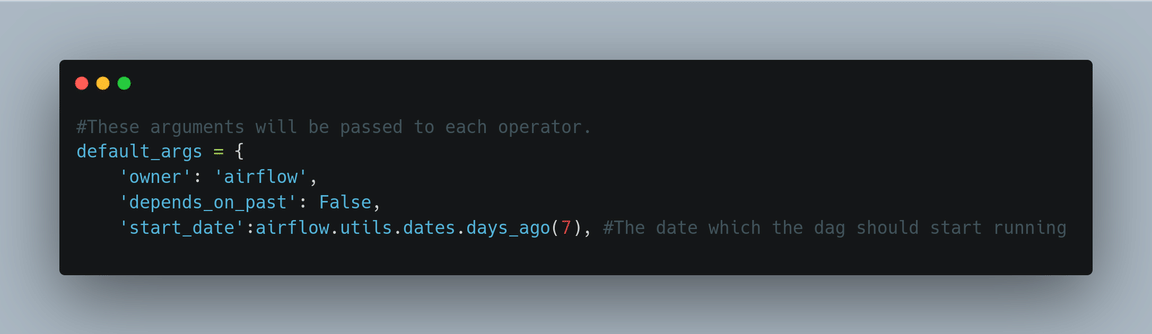
3. Write default arguments that will be explicitly passed to each task’s constructor.
4. We’ll need an object that instantiates pipelines dynamically.
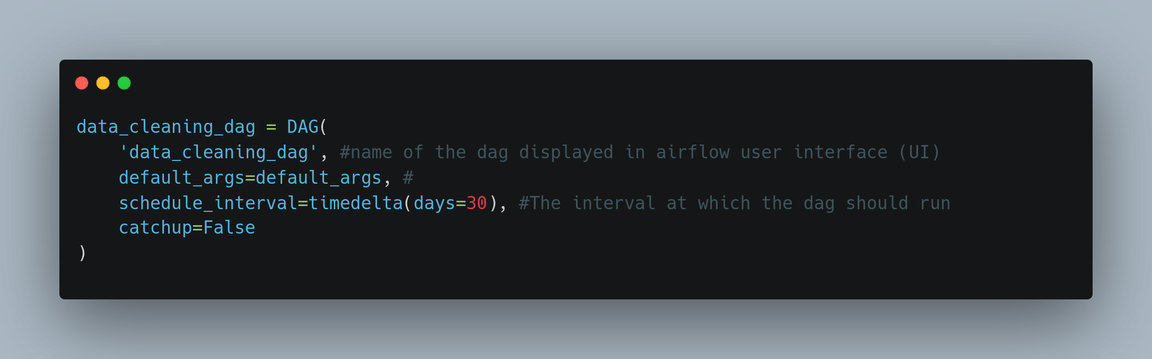
5. Write the tasks.
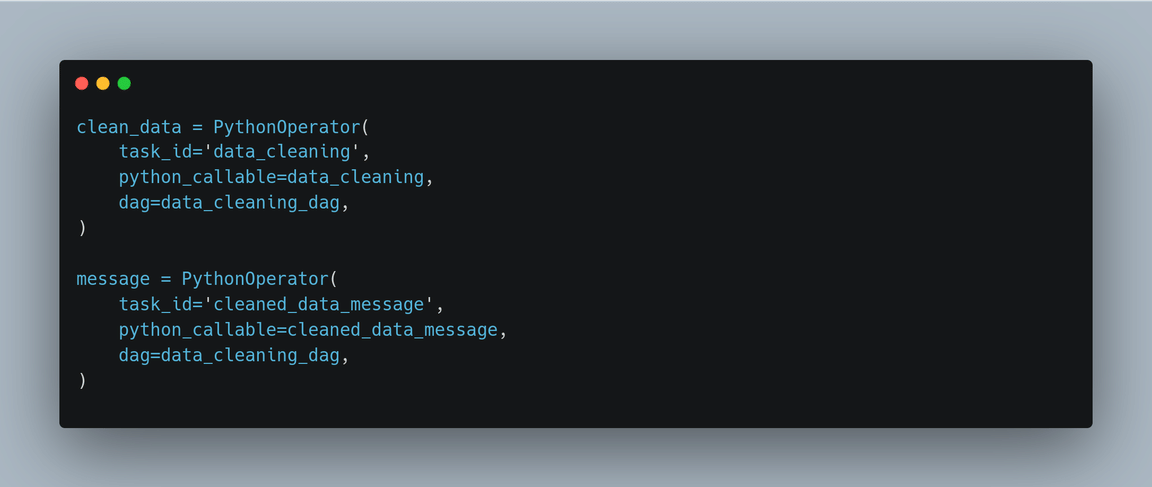
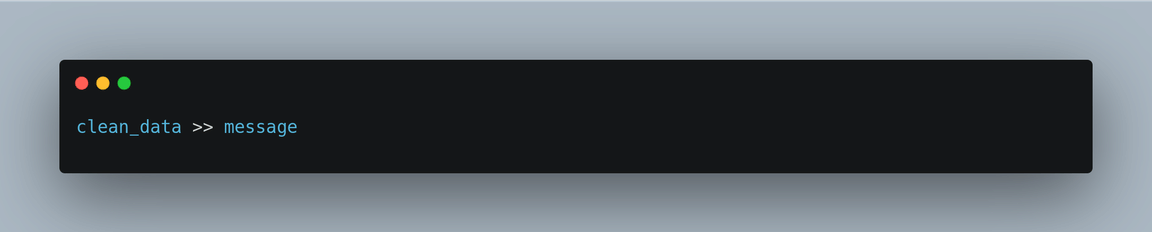
6. Set dependencies to tell airflow the order in which tasks will be executed. In our case, we’ll need to run the clean_data task first, followed by the message.
You can find the complete code for the DAG here(provide a link to the code). Just to mention, Airflow provides a powerful jinja templating engine with a set of built-in parameters and macros you can use when writing your DAG.
 CODEBOX
Leave a comment