
🚀 How We Process 10+ Million Records Daily Using Azure Databricks
Many people ask:
“How do you handle 10 million+ records every day without performance issues?”
Here’s the approach we follow in our Data Engineering project.
📥 Data Sources
• PostgreSQL
• CSV Files
• JSON Files
• Real-time Events (Kafka)
Instead of loading everything at once, we use incremental processing.
Bronze Layer
✔ Ingest raw data using Auto Loader
✔ Store data in Delta Lake
✔ Maintain schema evolution
✔ Capture audit columns
Silver Layer
✔ Data validation
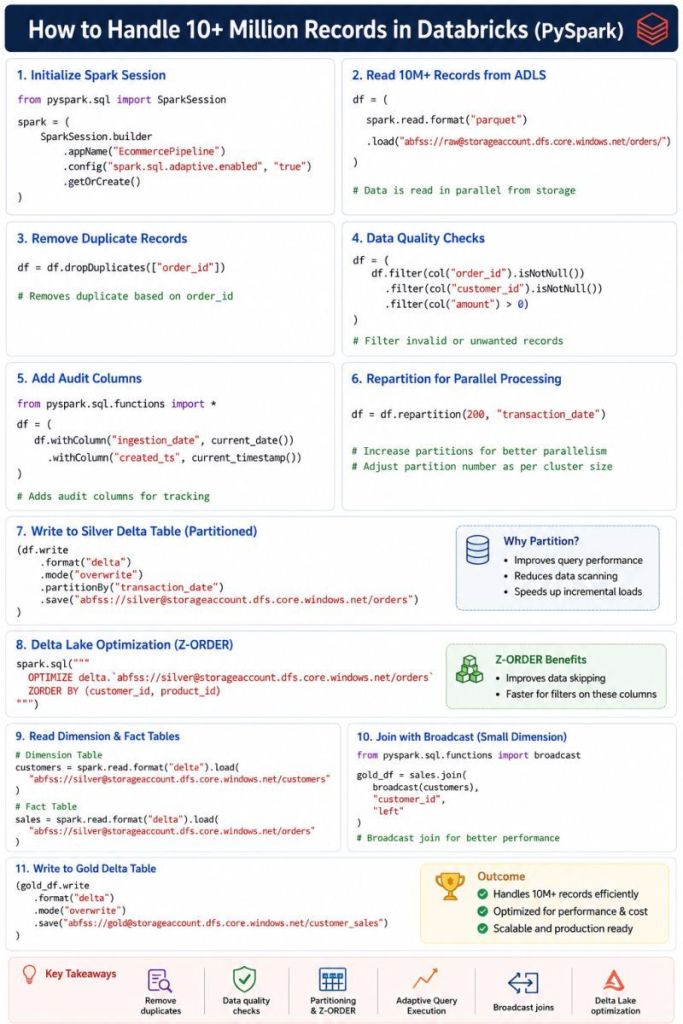
✔ Remove duplicate records
✔ Handle null values
✔ Standardize formats
✔ Apply business rules
Example:
df = df.dropDuplicates([“order_id”])
Gold Layer
✔ Create fact and dimension tables
✔ Build business KPIs
✔ Daily Revenue
✔ Customer Analytics
✔ Product Performance
Performance Optimizations
🔹 Partitioning on transaction_date
🔹 Z-ORDER on frequently filtered columns
OPTIMIZE sales
ZORDER BY (customer_id, product_id);
🔹 Adaptive Query Execution (AQE)
🔹 Broadcast joins for small lookup tables
🔹 Delta Lake optimization
🔹 Caching reusable datasets
Results
📈 Processed 10+ Million records daily
⚡ Reduced pipeline runtime from 2 hours to 45 minutes
💰 Lower compute cost
📊 Faster dashboard refreshes
🎯 Key Learning
Processing large volumes of data is not about having a bigger cluster.
It’s about:
✔ Efficient architecture
✔ Incremental processing
✔ Data quality checks
✔ Spark optimization
✔ Proper data modeling
A well-designed pipeline can process millions of records efficiently while keeping costs under control.
How many records does your biggest Spark pipeline process daily?
👇 Share your experience in the comments.
#DataEngineering #Databricks #AzureDatabricks #PySpark #ApacheSpark #DeltaLake #BigData #ETL #DataArchitecture #Azure #DataPlatform #AnalyticsEngineering


Leave a Reply